
Automatic mileage log for iPhone

The mileage log that keeps itself.

Fahrtenbuch records every drive in the background, lets you sort trips with a swipe and keeps a tamper-evident logbook – ready for HMRC or the German Finanzamt.

Download on the App Store

Free to start
iPhone & iPad · iOS 17 or later

  • No account
  • No ads, no tracking
  • Trips stay on your iPhone
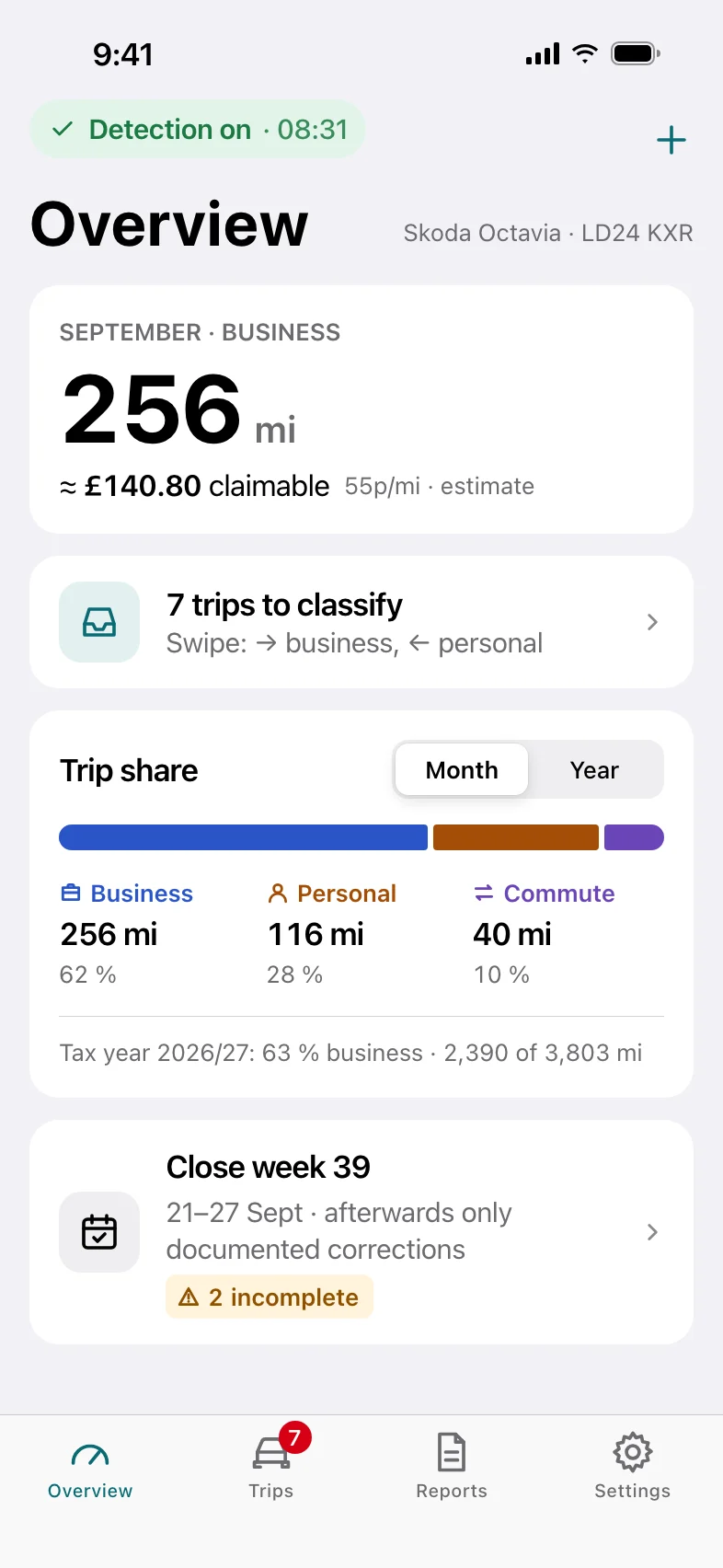
Overview screen: 256 business miles in September, about £140.80 claimable, 7 trips to classify and the trip share by category.
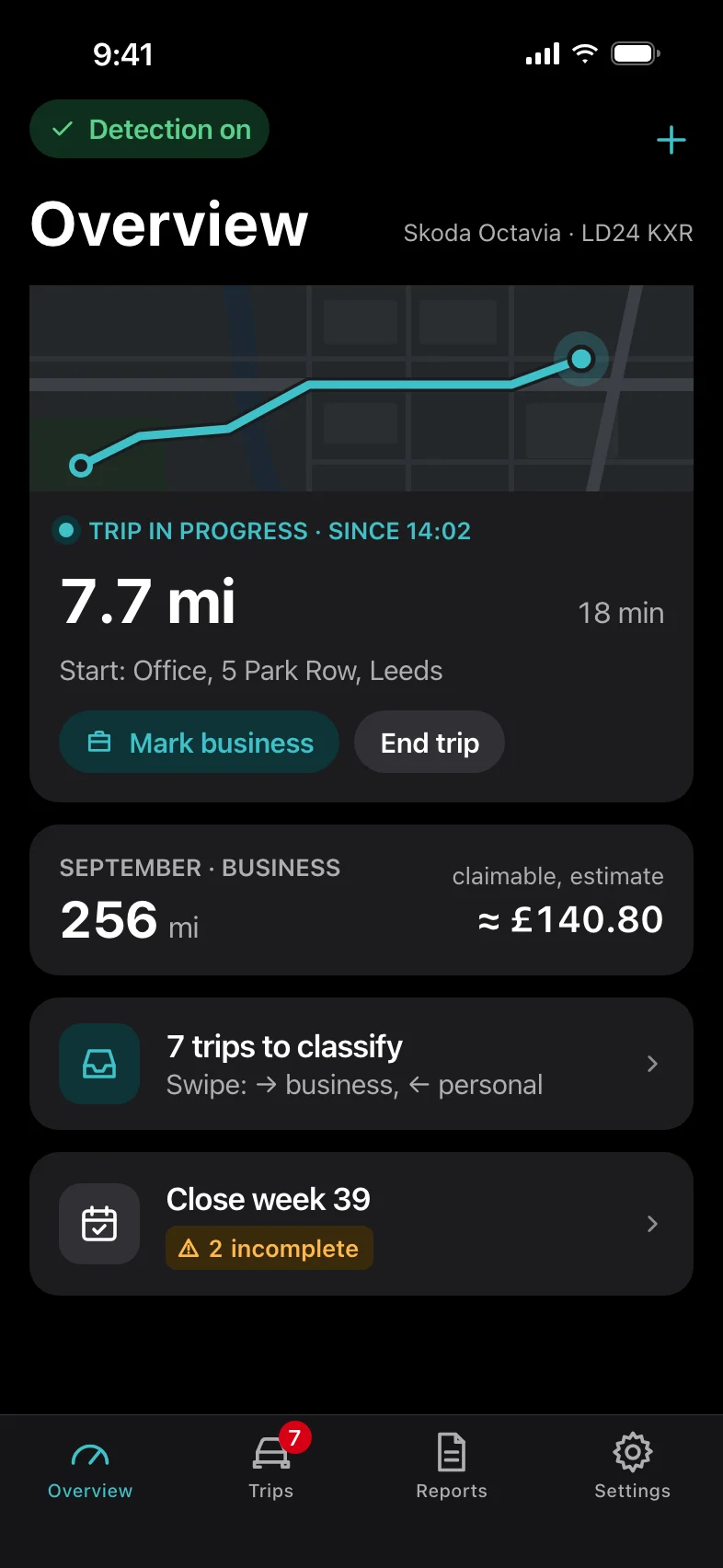
Overview in dark mode while a trip is being recorded: 7.7 miles in 18 minutes, with buttons to mark it as business or end the trip.
Features

Built for people who drive for work – and hate paperwork.

A proper logbook needs every trip, the right category, a purpose and an unbroken odometer. Fahrtenbuch handles the tedious parts and flags what needs your attention.

A trip in progress: live route on a map, distance and duration.
Automatic recording

Get in, drive. Your trip is already logged.

When your iPhone connects to CarPlay or your car's Bluetooth, a Shortcuts automation starts the recording. When you switch off, it stops. No app to open, no button to forget.

  • Start and end addresses are looked up automatically, and your saved places like Home and Office are recognised.
  • Mark a trip as business while you're still driving, or end it by hand if you need to.
  • Forgot your phone? Add trips manually. They're clearly marked as added later, with the date you entered them.
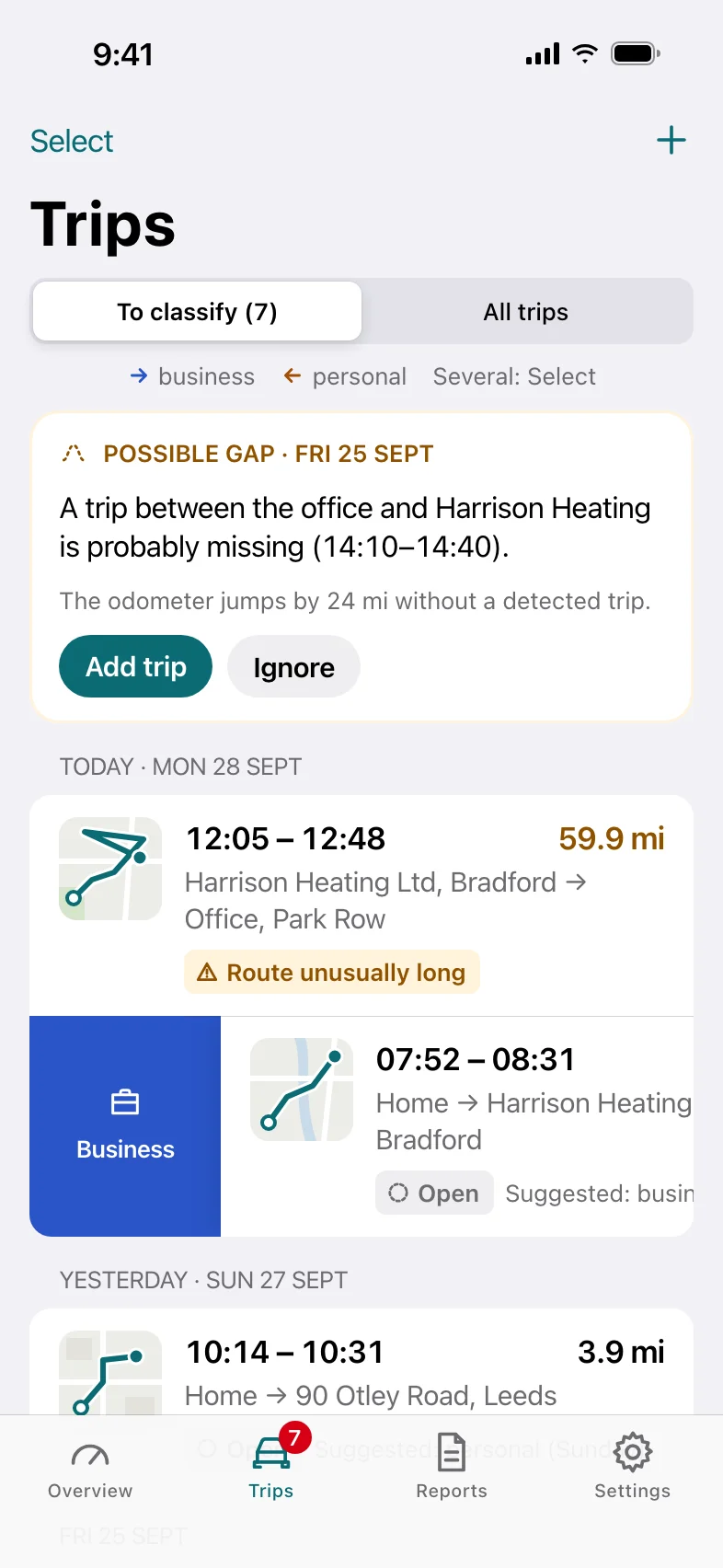
Trips inbox: a possible gap warning and trips waiting to be classified, one swiped to reveal the Business action.
Swipe to classify

Sort a week of driving in under a minute.

New trips land in your inbox. Swipe right for business, left for personal – or classify straight from the notification, without opening the app.

  • Commute suggestions for trips between your saved Home and Office.
  • Select several trips and classify them in one go as business, personal or commute.
  • Missing-trip detection spots gaps between trips and suggests the missing drive, so your odometer never jumps.
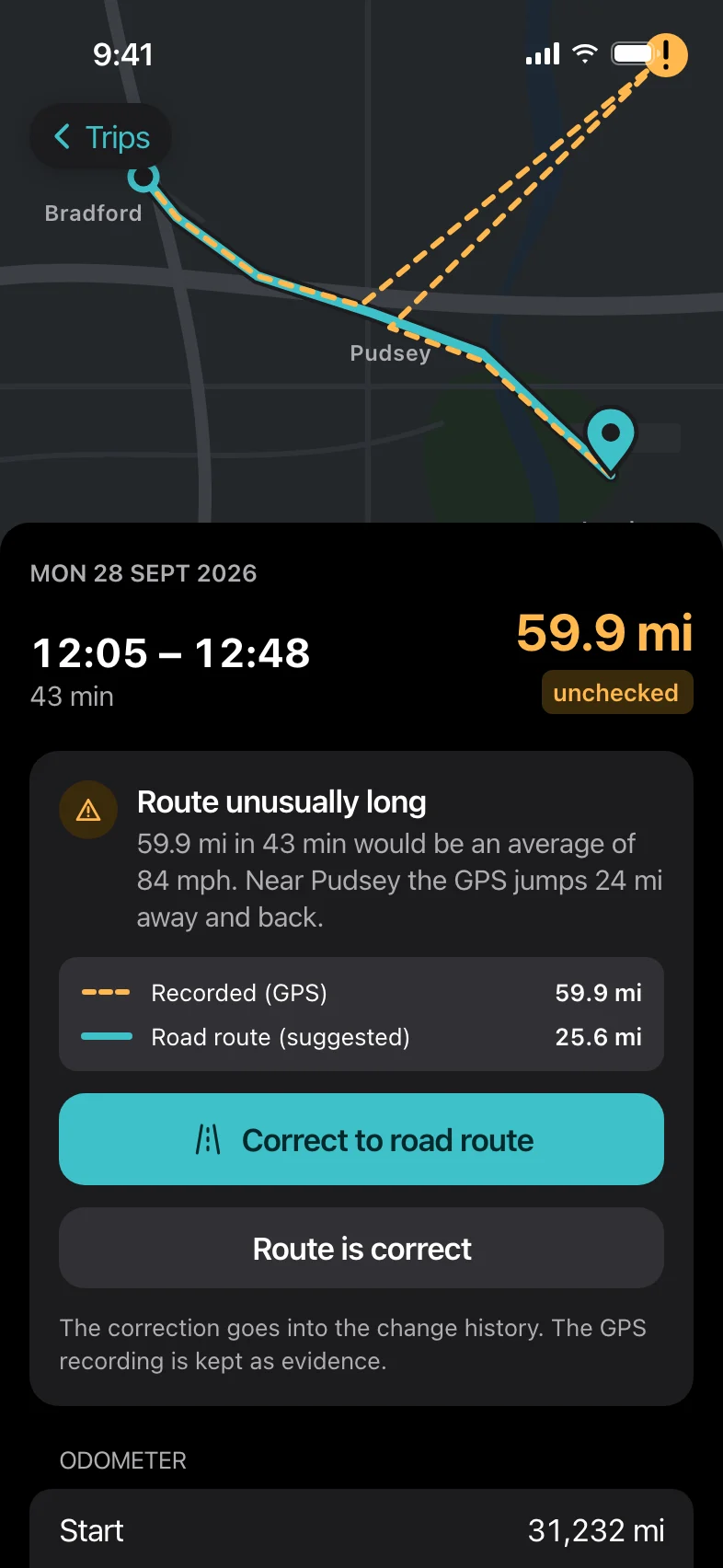
Trip detail in dark mode warning that the route is unusually long because of a GPS jump, with the option to correct it to the road route.
Plausibility checks

Catches mistakes before your tax office does.

GPS isn't perfect. Fahrtenbuch compares every recording with the road route and your odometer, and tells you when something doesn't add up.

  • GPS jumps detected – correct to the road route with one tap. The original recording is kept as evidence.
  • Odometer continuity – each trip must follow on from the last one, and your readings are checked against the distance driven.
  • Completeness check – see at a glance which trips still need a purpose or a client.
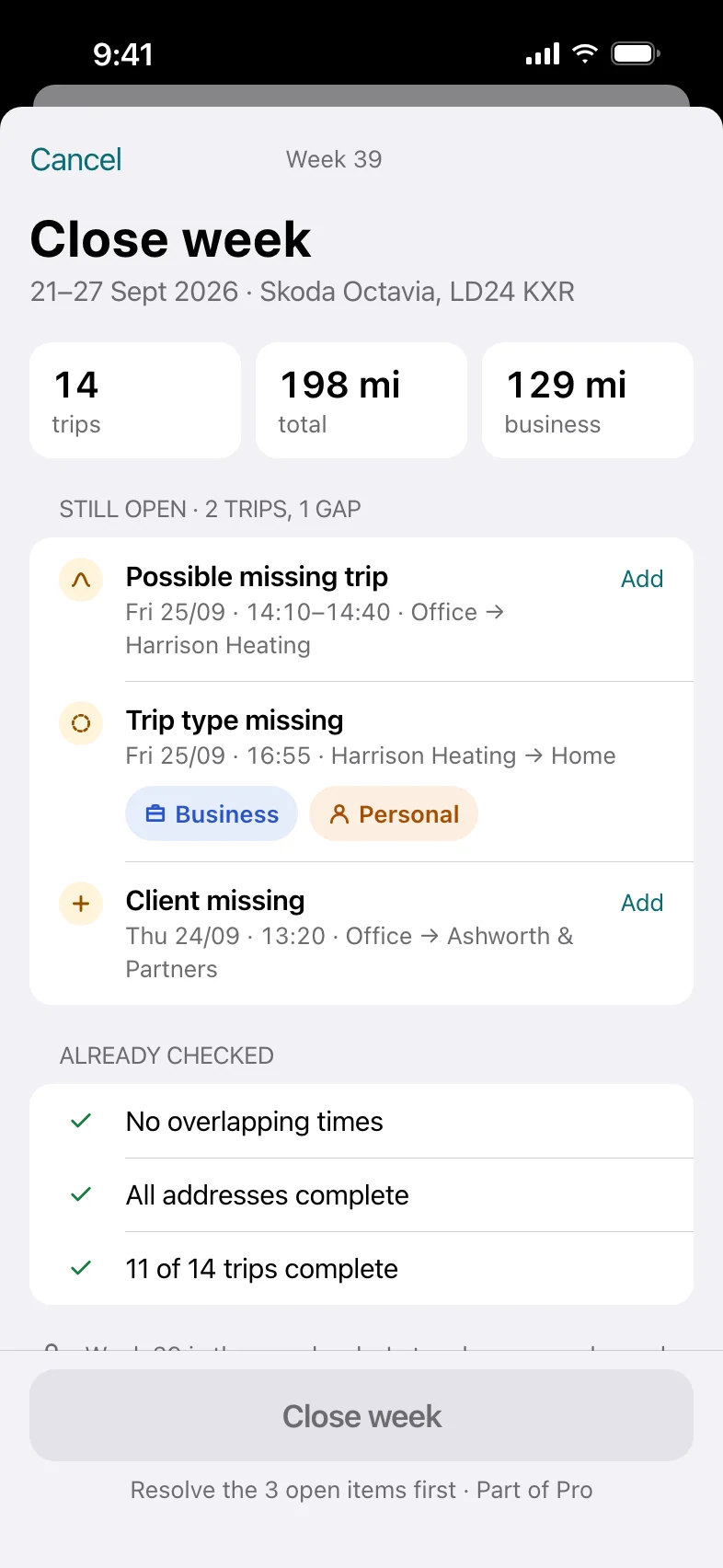
Close week sheet: 14 trips, 198 miles, with open items to resolve before the week is locked.
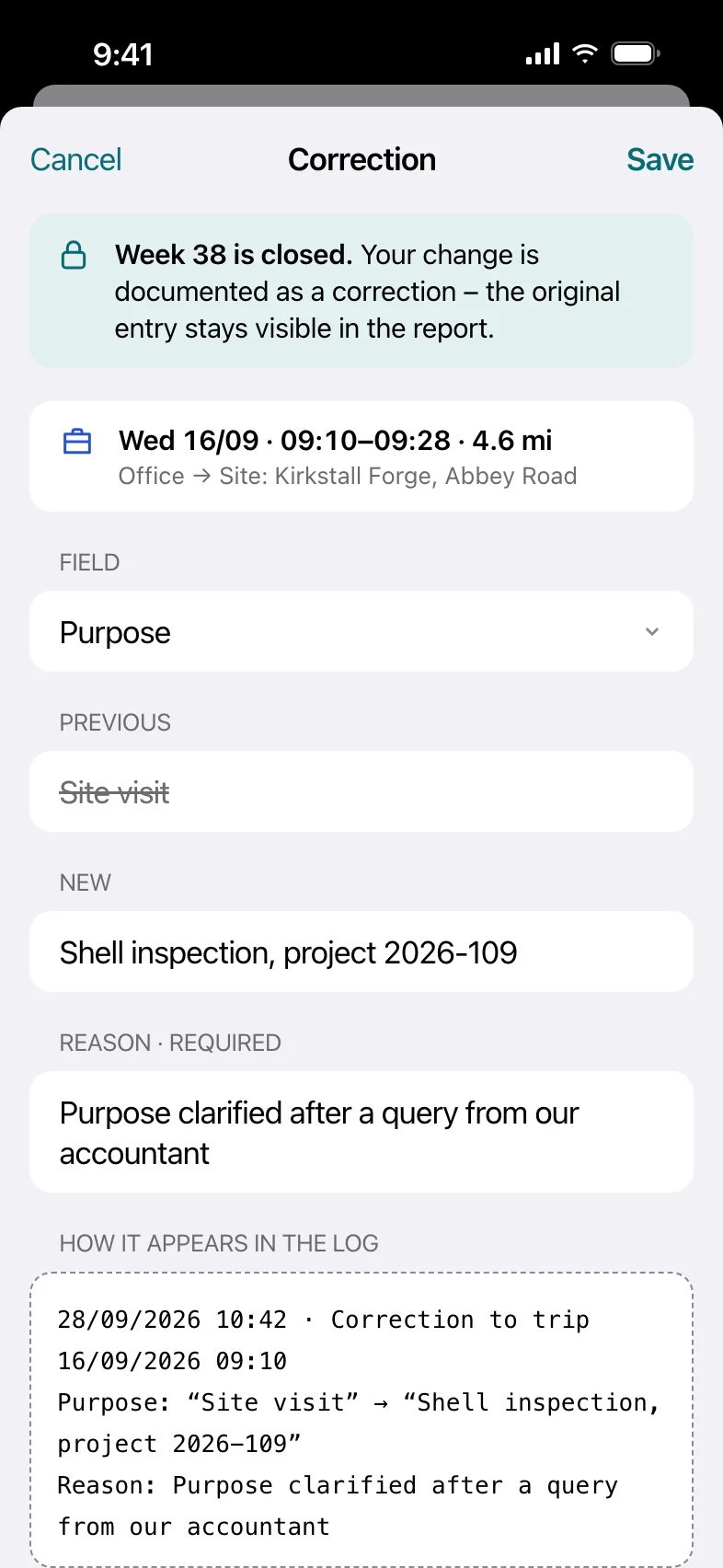
Correction sheet for a closed week: the old and new purpose and a required reason, shown as it will appear in the log.
Tamper-evident logbook

A logbook that holds up when someone asks.

Tax authorities want a mileage log that can't be quietly rewritten. Every change is recorded, and closed weeks can only be corrected openly.

  • Full change history for every trip – what changed, when, and how (automatically, by swipe, by rule or by hand).
  • Close the week once everything is complete. After that the week is read-only.
  • Documented corrections keep the old value, the new value and your reason – and the history is part of every export.
Everything in one place

All the details your logbook needs.

Business, personal, commute

Three trip types with clear colours, and your business share per month and tax year.

Purpose & client

Record the purpose, business contact and detours for every business trip – everything a tax inspector expects to see.

Claimable estimate

See what your business mileage is worth, calculated with the official rate for your country and tax year.

Gaps & GPS jumps

Missing trips and implausible routes are flagged, with a suggested fix you can accept or ignore.

Multiple vehicles Pro

Keep separate logbooks and odometers for every car you drive.

PDF & CSV export Pro

A complete logbook for your tax office or accountant, including the change history. Shared only when you choose to.

How it works

Set it up once. Then just drive.

  1. Install and allow location

    Choose “Always” when iOS asks for location access. That's what lets Fahrtenbuch record while the app is closed.

  2. Add two Shortcuts automations

    In the Shortcuts app, tell your iPhone when you're driving.

    When iPhone connects to CarPlay or your car's Bluetooth → Start trip
    When it disconnects → End trip

  3. Swipe, close, export

    Classify new trips with a swipe, close each week once it's complete, and export your logbook when your tax return is due.

Made for your tax rules

Miles or kilometres. Pounds, euros or dollars.

Fahrtenbuch picks up your region from your iPhone and uses the matching rate, units and tax year. You can change it at any time in Settings.

Germany

€0.30 per km business mileage. Logbook export for the Finanzamt.

United Kingdom

HMRC approved mileage rates in miles, tiered after 10,000 business miles. Tax year from 6 April.

Netherlands

The official tax-free rate per business kilometre.

France

Barème kilométrique by fiscal horsepower, with the bonus for electric cars.

Spain

The official flat rate per kilometre.

Australia

ATO cents-per-kilometre method, capped at 5,000 km per car. Tax year from 1 July.

Canada

CRA tiered per-kilometre allowance.

Everywhere else

Enter your own rate per mile or kilometre – Italy, Japan and anywhere else.

Privacy

Where you drive is nobody else's business.

Your trips, routes and addresses are stored on your iPhone – not on our servers. We don't have any. You don't create an account, and nothing is uploaded unless you share an export yourself.

Read the privacy policy →

  • Stored on your deviceTrips live in a local database on your iPhone. No cloud sync, no backend.
  • No tracking, no ads, no analyticsNo third-party analytics or advertising SDKs. Nothing to opt out of.
  • No accountNo sign-up, no email address, no password to leak.
  • Export or delete everythingDownload all your data as JSON and CSV, or erase it with one tap.
Pricing

Free to record. Pro when it's tax time.

Recording and classifying your trips is free, for as long as you like. Upgrade to Pro for the export and the extra logbook safeguards.

Free

Free forever

  • Automatic trip recording
  • Swipe and bulk classification
  • Missing-trip suggestions
  • GPS-jump and odometer checks
  • Change history for every trip
  • Monthly and tax-year summary
  • Export or delete all your data

Pro

Monthly or yearly subscription · 7-day free trial for new subscribers

  • Everything in Free
  • Logbook export as PDF and CSV
  • Close weeks and log documented corrections
  • Multiple vehicles

Prices are shown in the App Store in your local currency. Cancel any time in your Apple Account settings.

FAQ

Good questions.

What does “Fahrtenbuch” mean?

It's German for “logbook” – specifically the vehicle logbook drivers keep for the tax office. The app was designed around the strict German Finanzamt requirements, which is why it works just as well for HMRC and other tax authorities.

Does it drain my battery?

No. GPS only runs while a trip is being recorded – between the “Start trip” and “Stop trip” automations. The rest of the time, Fahrtenbuch isn't using location at all.

Will my tax office accept it?

Fahrtenbuch records everything a mileage log is usually required to contain – date, time, start and destination, distance, odometer, purpose and client – and keeps a complete change history so entries can't be silently altered. Whether a logbook is accepted is ultimately up to your tax authority, and the app isn't tax advice. If in doubt, check with your accountant.

What happens to my data if I change phones?

Your trips are part of your normal iPhone backup, so restoring a backup onto your new phone brings them along. You can also export all your data at any time from Settings → Your data.

Which languages does the app support?

The app is available in German today. English and further languages are on their way in an upcoming update.

More answers on the support page.

Never reconstruct a mileage log again.

Install Fahrtenbuch, set up the automation once, and let the logbook keep itself.